What's eating your storage? Use the "du" command to find out.
On this page
To dissect
sudo du -sh ~/Library/* | sort -hr | head -20Problem
I have a MacBook Air M2 with 16 GB RAM and 256 GB storage, so whenever free storage drops below 70 GB, I get the urge to clear it.
When I used Linux, I had a 200 GB partition and never worried much about storage. On the MacBook, however, macOS and the same software take up considerably more space. I had managed to keep around 100 GB free for a long time, but after using more AI tools, 80–85 GB became a comfortable number.
Recently, though, I noticed my free space dropping below 60 GB, which made me look more closely at what was taking up all the storage.
So, how do you examine disk usage?
Where to start looking for large storage
-
We are not going to be talking about clearing videos, photos, and large documents, as these are obvious storage.
-
Caches, Application Data, VM Images, Package Caches, and logs are less obvious storage.
So we want to monitor less obvious disk usage, but where to start:
-
In macOS, the
~/Libraryfolder stores user-specific application data, caches, and logs, which often grow unchecked and consume massive storage. -
Never delete the entire Library folder; it will break our application and system settings.
-
In Linux, user-specific application data, configuration, caches, and logs are generally stored in various directories such as
~/.config,~/.cache,~/.local/share,~/.var
Running the du command
Without any flags
-
Using the
ducommand directly likedu ~/Libraryis not much of use, as it spits a huge amount of output, making it difficult to understand where the actual storage is going. -
If you want to run and examine, then run this command, store the output in a txt file, and count the number of lines.
sudo du ~/Library > output.txtwc -l output.txt78347 output.txt-
78347 - number of lines, good luck examining that
-
It shows every level of the directory tree.
-
The storage shown is not in a human-friendly format (GB, MB, KB, etc are not clearly specified**)**
-
We first want to know which major directory is large.
-
-
Output - Last few lines
....
24	/Users/ot1878/Library/Caches/ms-playwright/chromium_headless_shell-1234/chrome-headless-shell-mac-arm64/resources
401488	/Users/ot1878/Library/Caches/ms-playwright/chromium_headless_shell-1234/chrome-headless-shell-mac-arm64
185632	/Users/ot1878/Library/Caches/electron/ef33c1c1407eeea89775ef92a07226a7f3301c3466e8ffe69e5ee2998f876d40
371264	/Users/ot1878/Library/Caches/electron
0	/Users/ot1878/Library/Caches/com.apple.iTunesCloud/Media
0	/Users/ot1878/Library/Caches/com.apple.iTunesCloud
0	/Users/ot1878/Library/Caches/main.kts.compiled.cache
56	/Users/ot1878/Library/Caches/com.anthropic.claudefordesktop.ShipIt
10514280	/Users/ot1878/Library/Caches
137122816	/Users/ot1878/Library
With -h flag
-
It also shows every level of the directory tree.
-
The difference between directly running
ducommand anddu -his that the size specified indu -his in human-friendly format (size suffix mentioned). -
Output - Last few lines
  24K	/Users/ot1878/Library/Caches/com.apple.cache_delete
  0B	/Users/ot1878/Library/Caches/com.anthropic.claudefordesktop
 16K	/Users/ot1878/Library/Caches/com.google.antigravity.ShipIt
  0B	/Users/ot1878/Library/Caches/com.apple.amsengagementd
  0B	/Users/ot1878/Library/Caches/com.apple.iTunesCloud/Media/EnhancedAudioSharedKeys
  0B	/Users/ot1878/Library/Caches/com.apple.iTunesCloud/Media
  0B	/Users/ot1878/Library/Caches/com.apple.iTunesCloud
du: /Users/ot1878/Library/Caches/com.apple.ap.adprivacyd: Operation not permitted
  0B	/Users/ot1878/Library/Caches/main.kts.compiled.cache
 28K	/Users/ot1878/Library/Caches/com.anthropic.claudefordesktop.ShipIt
5.0G	/Users/ot1878/Library/Caches
 65G	/Users/ot1878/Library
-his not specified forsortby POSIX. It is an extension provided by implementations such as GNUsortand the BSDsortshipped with macOS.
With -s flag
-
-sflag summarizes and gives us the total size of the directory. -
But the output is not human-friendly.
sudo du -s ~/Library- Output
136963360 /Users/ot1878/LibraryWith -sh flag
- -h flag combined with the -s flag gives us the summary in a human-friendly format.
sudo du -sh ~/Library- Output
65G /Users/ot1878/LibrarySummarize Each Top-Level Directory - Using *
- Instead of showing every level of the directory tree, or just the storage summary of the main folder, we can just check the storage of the top-level directories to get a better idea.
sudo du -sh ~/Library/*-
Output: Only top-level directory summary.
-
-s: summarizes
-
-h: human-friendly format
-
*→ selects each immediate item insideLibrary
-
7.5G	/Users/ot1878/Library/Group Containers
124K	/Users/ot1878/Library/homeenergyd
56M	/Users/ot1878/Library/HTTPStorages
0B	/Users/ot1878/Library/Input Methods
160K	/Users/ot1878/Library/Intents
  0B	/Users/ot1878/Library/Internet Plug-Ins
  0B	/Users/ot1878/Library/Keyboard Layouts
1.1M	/Users/ot1878/Library/KeyboardServices
 13M	/Users/ot1878/Library/Keychains
476K	/Users/ot1878/Library/LanguageModeling
 16K	/Users/ot1878/Library/LaunchAgents
  0B	/Users/ot1878/Library/LockdownMode
158M	/Users/ot1878/Library/Logs
4.6M	/Users/ot1878/Library/MediaAnalysis
 16K	/Users/ot1878/Library/Metadata
  0B	/Users/ot1878/Library/Microsoft
156M	/Users/ot1878/Library/Mobile Documents
  0B	/Users/ot1878/Library/News
2.5M	/Users/ot1878/Library/Passes
2.3G	/Users/ot1878/Library/pnpm
Sorting the results using - sort
sudo du -sh ~/Library/* | sort- Output:
0B	/Users/ot1878/Library/Assistants
0B	/Users/ot1878/Library/CallServices
  ...
12K	/Users/ot1878/Library/com.apple.bluetoothuser
12K	/Users/ot1878/Library/DataDeliveryServices
  ...
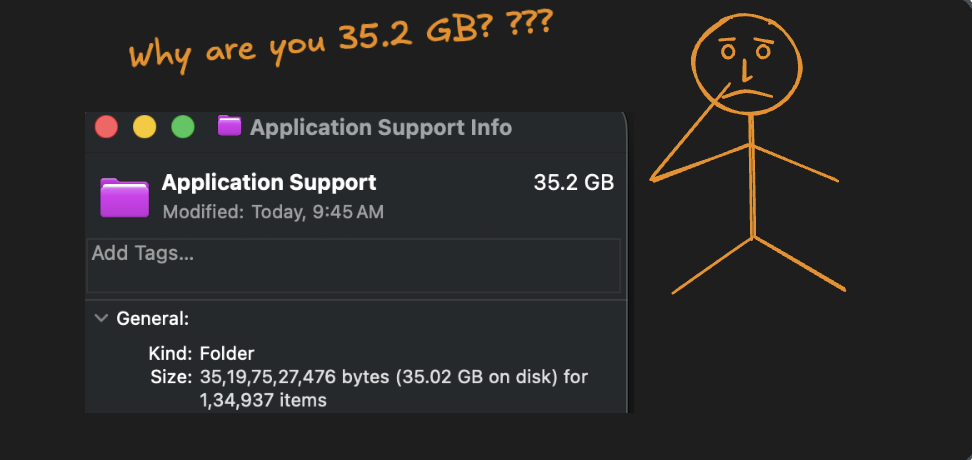
33G    /Users/ot1878/Library/Application Support
132K	/Users/ot1878/Library/com.apple.internal.ck
156M	/Users/ot1878/Library/Mobile Documents
158M	/Users/ot1878/Library/Logs
  ...
3.6G	/Users/ot1878/Library/Developer
336K	/Users/ot1878/Library/Application Scripts
372K	/Users/ot1878/Library/UnifiedAssetFramework
4.0K	/Users/ot1878/Library/SafariSafeBrowsing
4.0K	/Users/ot1878/Library/Spelling
6.1G	/Users/ot1878/Library/Caches
6.6G	/Users/ot1878/Library/Android
7.2M	/Users/ot1878/Library/Finance
7.3G	/Users/ot1878/Library/Containers
7.5G	/Users/ot1878/Library/Group Containers
8.0K	/Users/ot1878/Library/Audio
804K /Users/ot1878/Library/com.apple.AppleMediaServices- But as you can see, sort by default doesn’t sort according to size; it sorts the lines as text (lexicographically).
Reversing the sort order - sort -r
sudo du -sh ~/Library/* | sort -r- Output: Reverses the sort order lexicographically.
804K	/Users/ot1878/Library/com.apple.AppleMediaServices
8.0K	/Users/ot1878/Library/Audio
7.5G	/Users/ot1878/Library/Group Containers
...
4.0K	/Users/ot1878/Library/Spelling
4.0K	/Users/ot1878/Library/SafariSafeBrowsing
372K	/Users/ot1878/Library/UnifiedAssetFramework
336K	/Users/ot1878/Library/Application Scripts
3.6G	/Users/ot1878/Library/Developer
157M	/Users/ot1878/Library/Logs
 ...
156M	/Users/ot1878/Library/Mobile Documents
156K	/Users/ot1878/Library/Intents
132K	/Users/ot1878/Library/com.apple.internal.ck
 33G	/Users/ot1878/Library/Application Support
 ...
 12K	/Users/ot1878/Library/DataDeliveryServices
 12K	/Users/ot1878/Library/com.apple.bluetoothuser
 ...
  0B	/Users/ot1878/Library/CallServices
  0B	/Users/ot1878/Library/Assistants
Sorting the results according to size - sort -h
sudo du -sh ~/Library/* | sort -h- Output: Sorted by size in increasing order
0B	/Users/ot1878/Library/Assistants
...
160K	/Users/ot1878/Library/Intents
..
226M	/Users/ot1878/Library/Fonts
...
6.6G	/Users/ot1878/Library/Android
7.3G	/Users/ot1878/Library/Containers
7.5G	/Users/ot1878/Library/Group Containers
 33G	/Users/ot1878/Library/Application Support
Sorting the results according to size in reverse order - sort -hr
sudo du -sh ~/Library/* | sort -hr- Output: Sorted by size in decreasing order.
33G	/Users/ot1878/Library/Application Support
7.5G	/Users/ot1878/Library/Group Containers
6.1G	/Users/ot1878/Library/Caches
226M	/Users/ot1878/Library/Fonts
 ...
112K	/Users/ot1878/Library/Contacts
108K	/Users/ot1878/Library/Translation
...
 12K	/Users/ot1878/Library/DataDeliveryServices
 12K	/Users/ot1878/Library/com.apple.bluetoothuser
...
  0B	/Users/ot1878/Library/CallServices
  0B	/Users/ot1878/Library/Assistants
Limiting the number of results from the top - Using head
sudo du -sh ~/Library/* | sort -hr | head -20- Output: Only the first twenty lines is displayed.
33G	/Users/ot1878/Library/Application Support
5.0G	/Users/ot1878/Library/Caches
3.6G	/Users/ot1878/Library/Developer
2.3G	/Users/ot1878/Library/pnpm
226M	/Users/ot1878/Library/Fonts
 13M	/Users/ot1878/Library/Keychains
7.2M	/Users/ot1878/Library/Finance
5.1M	/Users/ot1878/Library/Preferences
4.6M	/Users/ot1878/Library/MediaAnalysis
3.4M	/Users/ot1878/Library/Accessibility
2.5M	/Users/ot1878/Library/Passes
2.1M	/Users/ot1878/Library/WebKit